How to Track Instagram, TikTok, YouTube and X in Google Search Console
Google Search Console now lets you track how content from Instagram, TikTok, YouTube and X performs when people discover it through Google. Add each account as a platform property to see the queries, clicks, impressions, CTR, average position and individual posts or videos driving search visibility. You do not need a website, but every social account must be connected and tracked separately.
This closes an important reporting gap. A social post can attract attention from Google long after its initial feed activity slows down, and platform properties show which topics and formats continue bringing people to your content.
Google’s officialguide to analyzing social and video content in Search Console explains how to use the reports to spot trends, compare formats and turn search behavior into content decisions.
What You Need to Know:
Supported platforms: Instagram, TikTok, YouTube and X.
Setup:Add and verify each account as a separate Search Console property.
Available data:Clicks, impressions, CTR, average position, queries, content, countries, devices and dates.
Google surfaces:Data may come from Search, Discover and Google News when the content appears there.
Important limitation:Search Console measures discovery on Google—not views, likes, comments, shares or watch time inside the social platform.
The goal is not simply to collect another set of numbers. It is to connect search demand with the content people discover across the web—a core part of a broaderSearch Everywhere Optimization approach.
What Are Platform Properties in Google Search Console?
A platform property represents an account or channel hosted on a supported third-party platform. Instead of verifying a domain, you connect an Instagram, TikTok, YouTube or X account and authorize Google to confirm that you control it.
Once connected, Search Console reports how content from that account performs across Google surfaces. This creates a clearer view of search visibility beyond your website, especially as videos, social posts and firsthand perspectives appear in experiences such as short-video carousels, latest-post carousels and “What people are saying” results.
Google currently supports four platforms:
Instagram.
TikTok.
YouTube.
X.
Each account must be added separately. If a company manages two Instagram profiles, one TikTok account and one YouTube channel, it will need four platform properties.
Platform properties appear alongside website properties in the regular Search Console property selector. They do not replace your website property or combine all channels into one report.
What Can You Track?
The Performance report provides the familiar Google Search metrics used for websites:
Clicks:How often someone clicked your social content from a Google surface.
Impressions:How often eligible social content appeared to a user on Google.
Average CTR:The percentage of impressions that generated a click.
Average position: The average position of the content when it appeared in search results.
You can analyze the data by search query, individual post or video, country, device and date. Depending on where the content earns visibility, reporting may also be available for Google Discover and Google News.
Search Console also includes an Insights report with a more accessible overview of recent trends, top-performing posts and the ways people discover the account. An Achievements section highlights milestones such as reaching a new click threshold during a 28-day period.
This is Google visibility data, not native social media analytics. Search Console does not show TikTok views, Instagram reach, YouTube watch time, X engagement or follower growth inside the platforms. You will still need each platform’s analytics tools for those metrics.
How to Add an Instagram, TikTok, YouTube or X Property?
The setup follows the same general process for all four platforms.
1. Open Google Search Console
Sign in to Google Search Console with the Google account that should manage the reporting.
For a business or client account, use a company-controlled Google account whenever possible. Avoid connecting a channel through an employee’s personal login if the organization will need continued access after that person’s role changes.
2. Open the property selector
Click the property selector in the upper-left area of Search Console, then choose Add property. You can also begin from the Search Console welcome screen.
3. Select the social platform
Look for the platform property options and click Add next to Instagram, TikTok, YouTube or X.
If the options do not appear, confirm that you are using the correct Search Console account and refresh the page. Google completed the global rollout in July 2026, but account permissions or an expired session may still interfere with setup.
4. Authorize the correct account
Follow the onscreen prompts to sign in to the selected platform and authorize the connection.
Before approving access, check the username or channel name carefully. This matters when multiple brand, personal or client accounts are open in the same browser.
You do not need to upload an HTML file or create a DNS record. Verification is completed through the authorized platform connection. In some cases, Google may also recognize an account already associated with a verified website property.
If you previously claimed a Google Search Profile, its verified social accounts may already appear automatically as platform properties. Open the property selector before adding them manually to check whether they are available.
5. Finish verification
After Google confirms ownership, select Go to property. The new platform property will appear in the property selector like any other Search Console asset.
6. Repeat the process for every account
Connecting Instagram does not automatically connect TikTok, YouTube or X. Repeat the setup for each account you want to monitor—even when all accounts belong to the same company.
7. Allow time for reporting
Do not expect a complete report immediately. It can take a few days for data to appear after a property is connected.
Google periodically checks account ownership. If a platform authorization expires or is revoked, reporting access will pause until the account is verified again. Reconnecting restores access to the existing report, so you do not need to rebuild the property from scratch.
How to Read the Performance Report?
Open the platform property and select Performance. Start with the four primary metrics (clicks, impressions, CTR and average position) then move beyond the totals.
Review the queries bringing people to your content
The Queries view shows the words people searched before seeing or clicking a social post or video. Group related terms by intent instead of treating every variation as a separate idea.
For example, searches such as “how to optimize a YouTube title,” “YouTube title SEO” and “best title for YouTube video” may reveal one broader audience need. That theme could support a new video, an Instagram carousel, a TikTok series and a detailed website article.
Look for:
Queries with high impressions but low CTR.
Unexpected terms revealing a new audience interest.
Branded searches showing demand for the company or creator.
Non-branded questions that could become new content.
Queries gaining or losing visibility over time.
The Insights report also organizes related queries into top, trending up and trending down groups. These clusters make it easier to identify topics gaining momentum without reviewing every query individually.
Identify the posts earning Google visibility
Use the content or page dimension to find the individual posts and videos receiving traffic. A post with modest native engagement may still perform well in Google because it answers a lasting search need.
Pay particular attention to older content that begins gaining impressions again. It may be tied to a seasonal topic, a news cycle or renewed demand. Instead of letting that momentum pass, update related website content, create a follow-up post or cross-promote the original asset.
Compare devices and countries
Device data can reveal whether people discover the content primarily on mobile or desktop. Country data helps determine whether Google is surfacing it in the markets the brand actually wants to reach.
If an account targets the United States but most search visibility comes from another country, review the language, examples, captions, spoken terms and supporting website content. The content may be sending stronger geographic signals than intended.
Compare formats and playlists
Use page filters and comparison mode to evaluate how different formats perform instead of treating every URL alike.
YouTube: Compare URLs containing /watch with URLs containing /shorts/ to evaluate long-form videos against Shorts.
Instagram: Compare URLs containing /p/ with URLs containing /reels/ to evaluate standard posts against Reels.
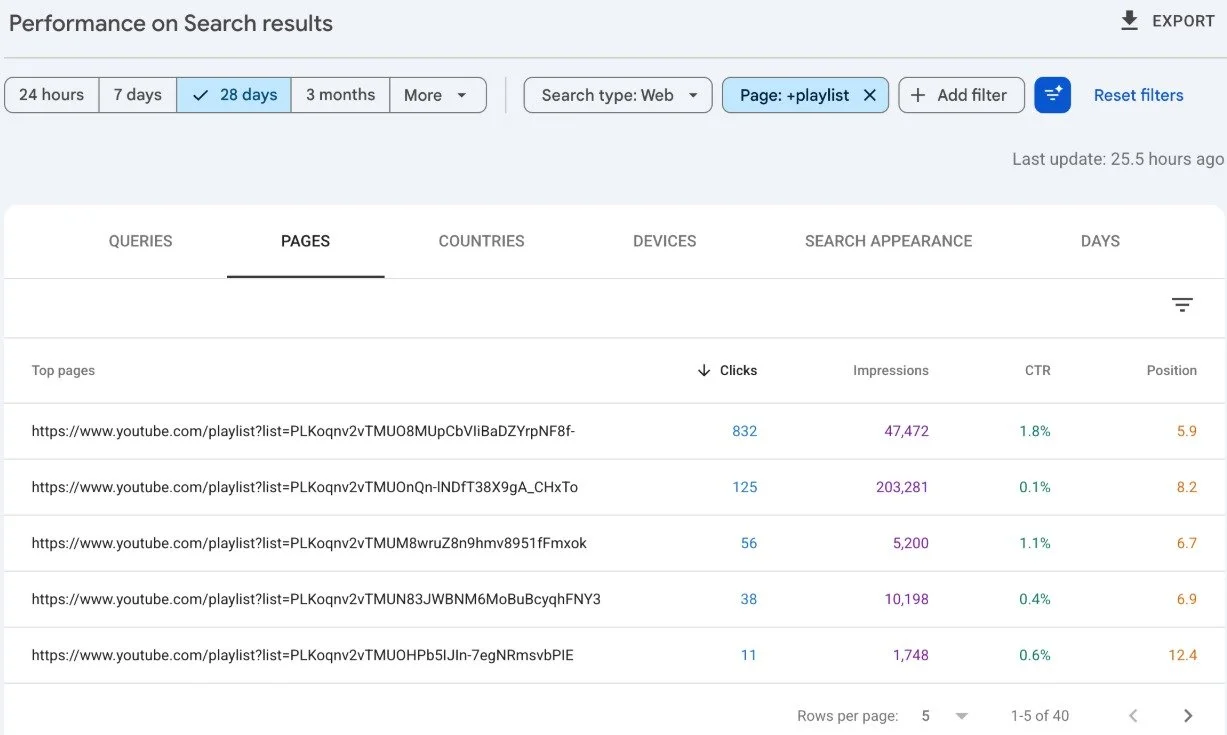
YouTube playlists: Filter URLs containing playlist to compare playlist pages using clicks, CTR and average position. Remember that this measures the playlist page itself, not the individual videos inside it.
These comparisons can reveal whether the topic is underperforming or whether the format needs to change. For example, strong long-form YouTube visibility paired with weak short-form traction may indicate that the audience prefers a more detailed explanation.
Use recent data to catch a spike
The 24-hour view can help identify a post or video that is suddenly gaining Google visibility. A spike may justify faster action: share the content on other channels, link to it from a related page, publish a follow-up or respond to the questions appearing around the same topic. Cross-check the topic in Google Trends to determine whether demand is also rising more broadly.
How to Use the Insights Report
The Insights report is useful when you want the main story without building multiple filters. It summarizes clicks from the last 28 days, shows how traffic is distributed across Google surfaces, highlights leading content and groups the search themes helping people discover the account.
Use it during weekly or monthly reviews to answer questions such as:
Which posts are currently bringing in the most Google traffic?
What topics are trending upward or downward?
Is search visibility concentrated in one piece of content?
Are people finding the account through branded or informational searches?
Which content deserves an update, sequel or cross-platform version?
Insights is a strong starting point, but the Performance report is better for detailed analysis and comparisons.
How to Compare Instagram, TikTok, YouTube and X
Search Console does not currently merge all platform properties into a single cross-channel dashboard. To compare them, open each property, use the same date range and export the data to a spreadsheet.
Use the same three-part review for every platform:
Visibility: Which channel earns the most Google impressions, and where is average position improving?
Response: Which channel turns those impressions into clicks and has the strongest CTR?
Opportunity: Which queries, posts, countries and devices reveal topics or formats worth expanding?
To make the comparison reliable, select the same date range in every property, export each report and label it by platform. Then look for decisions—not just winners. A high-impression YouTube video may deserve a TikTok version, while an Instagram Reel with strong CTR may reveal a topic worth developing into a longer video or website article.
Raw totals should not be the only measure of success. A YouTube channel may naturally earn more search impressions because long-form videos can match detailed queries, while X may support timely discussions. Compare each platform’s performance against its role, content volume and audience—not just against the largest number in the sheet.
For teams also measuring visibility in AI-generated results, these exports can complement a wider set of AI SEO success metrics, including brand mentions, citations and share of voice.
8 Ways to Turn the Data Into Better Content
1. Improve content with high impressions and low CTR
Strong impressions show that Google sees relevance. A weak CTR may mean the title, caption, thumbnail, opening text or topic framing is not compelling enough. Review what appears in the search result and make the promise more specific without resorting to clickbait.
If the content is relevant but the visual presentation is weak, stronger thumbnails, post templates and brand consistency can also help it stand out. Professional graphic design services can support that work across social and search-facing assets.
2. Expand a winning post into a website article
If a TikTok, Instagram post or YouTube video earns sustained traffic for an important query, build a fuller resource on your website. Embed or link to the original content where useful and cover the questions that a short-form post could not answer.
3. Repurpose demand across platforms
A search theme performing on YouTube may also work as an Instagram carousel, TikTok explainer or X thread. Adapt the format instead of copying the same post word for word.
For a wider framework, see how to build a 2026 content strategy for Google, AI Overviews, SEO and social media.
4. Refresh older content that is regaining traction
An older video gaining impressions again has already demonstrated relevance. Consider updating its title or description, pinning it, adding a related follow-up and checking whether the facts are still current.
5. Find gaps between website and social performance
Compare the queries from the platform properties with the queries from the website property. If social content performs for a topic the site barely covers, there may be an organic search opportunity. If a website page ranks but social channels have no related content, create supporting videos or posts. This cross-channel analysis should become part of a broader SEO and AI visibility strategy.
6. Track important content changes
Use Search Console annotations to mark meaningful updates, such as rewriting a YouTube title, changing a TikTok caption or refreshing an Instagram post. Then compare performance before and after the change without relying on memory.
7. Use organic search language in paid campaigns
Queries that generate impressions or clicks can reveal the language customers use before discovering the brand. Share those themes with paid media teams to inform campaign keywords, ad copy, landing pages and creative tests. Search Console does not report paid performance, but its organic insights can strengthen a coordinated paid advertising strategy.
8. Build a search-informed content calendar
Use query themes, top posts and rising topics to plan upcoming content. Search Console will not replace creative judgment, but it can show where real demand already exists.
Common Mistakes to Avoid
Expecting native-platform metrics: Search Console measures performance on Google, not activity inside the social network.
Connecting the wrong account: Verify the username or channel before authorizing access.
Assuming one property covers every channel: Each account needs its own platform property.
Judging performance too early: New properties need time to collect data.
Looking only at clicks: Impressions, queries, CTR and content-level trends often reveal opportunities before traffic becomes substantial.
Comparing channels without context: Different platforms and formats have different search behavior.
Ignoring connection status: Expired authorization can pause access until the account is verified again.
What This Changes for SEO and Social Media Teams
Search and social discovery are no longer separate reporting conversations. A person may search on Google, encounter a YouTube video, open an Instagram post or watch a TikTok without ever visiting the company’s website. Those interactions still shape brand visibility and can now be measured more clearly. This is especially important because YouTube, Reddit and forums can also influence AI search results.
For SEO teams, platform properties expose content and query opportunities beyond the domain. For social teams, they reveal which posts continue working after the initial feed cycle. For brands, they create a more complete picture of how people discover expertise across the web—and whether their brand strategy and identity remain consistent across channels.
The most useful approach is not to treat Search Console as another social dashboard. Use it specifically to understand the connection between search demand and social content: what people are looking for, which formats Google surfaces and where the brand has an opportunity to provide a better answer.
FAQs
1- Do I need a website to track social media in Google Search Console?
No. A creator or brand can connect an eligible Instagram, TikTok, YouTube or X account without owning a website.
2- Can I see Instagram, TikTok, YouTube and X in one Search Console report?
Not as one combined property. Each account is added and reported separately. You can export the same metrics from each property and combine them in a spreadsheet or reporting dashboard.
3- Does Search Console show views and engagement from the social platforms?
No. It reports how the content performs on Google surfaces. Use the native analytics tools for watch time, likes, comments, shares, follower growth and feed reach.
4- How long does it take for platform property data to appear?
Google advises allowing a few days after verification for reports to begin showing data.
5- What happens if the platform connection expires?
Access to the property pauses until ownership is verified again. After reconnection, the existing report becomes available; the property does not need to be recreated.
6- Can social content appear in Discover or Google News reports?
Yes, when eligible content receives visibility on those Google surfaces. Those reports only appear when there is relevant performance data.
Make Social Search Part of Your SEO Strategy
Platform properties give brands and creators a clearer view of what happens when social content leaves the feed and enters Google Search. The most valuable signals are not only total clicks, but also the queries gaining momentum, posts earning repeated impressions and formats performing differently across channels.
Use those findings to update captions and titles, revisit older content, create follow-up posts and connect successful social topics with relevant website pages. Over time, this creates a stronger content system in which SEO and social media support the same audience needs.
The data can also show which topics are strengthening brand authority beyond traditional rankings. If broader visibility is a priority, learn how to get your brand mentioned in AI answers.
Need Help Improving Your Search Visibility?
Search data is most valuable when it leads to a clear strategy. Searches Everywhere helps brands connect website SEO, social discovery and AI visibility to reach customers wherever they search.
Contact Searches Everywhere for SEO services, or email lauren@searcheseverywhere.com and seo@searcheseverywhere.com to discuss your goals.